Start With the Right Ecosystem
Before you dive into automating your home, it’s important to choose the ecosystem that best fits your current devices and future goals. Whether you go with Amazon Alexa, Google Home, or Apple HomeKit, your selection will influence what devices work together and how seamlessly.
Choose Your Primary Ecosystem
To avoid headaches down the line, select your ecosystem based on the devices you already own or plan to integrate.
Amazon Alexa: Offers broad device compatibility and strong third party support.
Google Home: Native integration with Android and deep Google service tie ins like Calendar and Maps.
Apple HomeKit: Prioritizes privacy and works best with iPhones, iPads, and other Apple products.
Tip: If you use a mix of platforms (e.g., Android phone with an iPad or Echo speaker), prioritize the ecosystem with the broadest compatibility.
Why Compatibility Matters
Not all smart devices play nicely with every ecosystem. Before buying smart locks, thermostats, or plugs, make sure they support your chosen platform.
Devices to watch for compatibility:
Smart switches and plugs
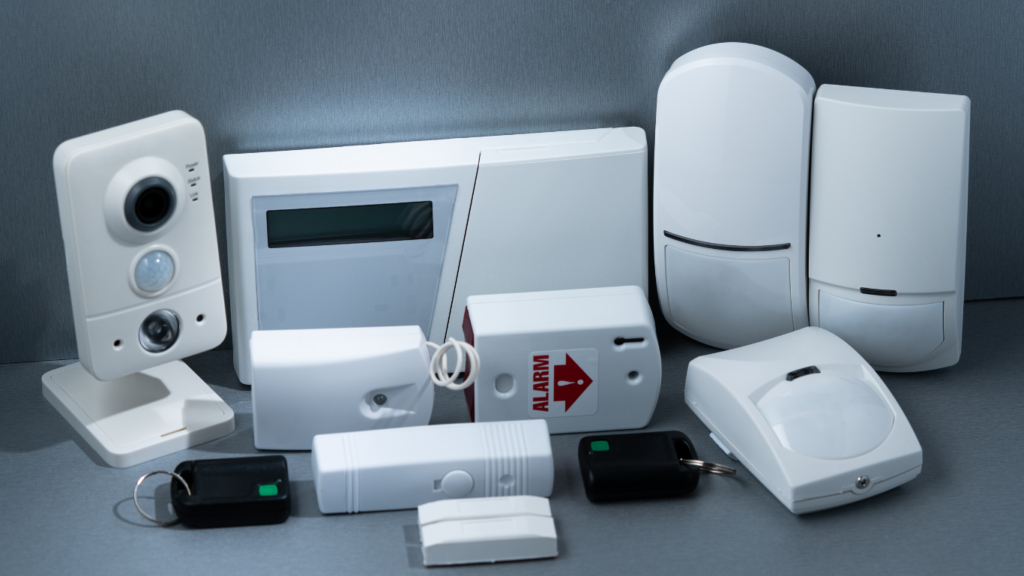
Sensors (motion, temperature, contact)
Smart lights and thermostats
Voice assistant enabled devices
App support: Check whether the device setup app works on your phone’s operating system and syncs properly with your ecosystem.
Do You Need a Hub?
Some ecosystems like Apple HomeKit or older Zigbee/Z Wave networks require a hub for full functionality. Others, such as Alexa and Google Home, operate mostly cloud based but may still benefit from a local hub for faster performance and enhanced coordination.
Use a hub if:
You need to connect Zigbee or Z Wave devices
You want local control during internet outages
You’re building advanced automations that require minimal latency
Skip the hub if:
You’re sticking to Wi Fi or Bluetooth enabled devices that work natively with your chosen platform
Your automation needs are basic and mostly cloud handled
Starting with the right ecosystem and understanding what devices and hubs it works with sets the foundation for everything that follows in your smart home automation journey.
Identify High Impact Daily Tasks
Automated routines work best when they streamline tasks you do every day. Focus first on moments that repeat like mornings, evenings, and energy usage and build routines designed to save time, reduce stress, and even cut costs.
Morning Routines: Start the Day Right
Automating your morning helps create a smoother start and eliminates the need to think about details. Consider:
Smart lights that gradually brighten to mimic sunrise when your alarm goes off
Thermostats that pre heat or cool your home just before you wake
Smart plugs to start your coffee maker or kettle at a scheduled time
These small automations can improve mood and efficiency before you even check your phone.
Evening Routines: Wind Down with Ease
End of day routines can help create a relaxing atmosphere and reinforce home security. Try automating:
Lighting presets that dim or shift to warmer tones in the evening
Smart locks that engage automatically after a certain hour
Ambient audio systems that activate calming music or white noise at bedtime
Set routines to trigger these changes on a schedule or in response to a voice command like “Good night.”
Save Energy with Smart Automation
Beyond comfort and convenience, routine automation can also reduce your energy bills. Target the biggest efficiency gains with:
Smart plugs that turn off devices when not in use
Occupancy sensors that detect empty rooms and adjust lighting or HVAC
Schedules to align appliance use with off peak energy times when possible
Done right, these routines pay for themselves over time while lowering your environmental footprint.
Build Your First Routine

Let’s break it down: automation runs on a simple formula trigger + action. A trigger is what sets things off (like you unlocking your front door), and the action is what follows (your hallway lights turning on). That’s it. Everything you build hangs on that relationship.
Here’s how to build a basic entryway routine in plain steps:
- Open your home automation app (Alexa, Google Home, etc.).
- Choose the device or event that will act as the trigger say, your smart lock unlocking.
- Define the actions to follow: turn on entry lights, play a playlist, adjust the temperature.
- Save it. Test it. Tweak as needed.
This kind of routine saves time and cuts friction. You’re not walking into a dead silent, pitch black room anymore. It just works.
A few safety tips: always confirm your triggers. You don’t want routines firing randomly. Avoid setting sensitive actions (like unlocking doors) from vague triggers like motion alone. Also, make sure your devices reconnect properly after power outages many don’t by default.
For a more in depth walkthrough, check this automated home routines guide.
Use Sensors to Make It Smarter
Smart sensors are the secret sauce behind a truly responsive home. Instead of relying solely on schedules or voice commands, sensors let your environment respond to real world activity in real time.
Motion Sensors: Automate Lighting and Climate
Motion sensors are one of the easiest ways to make your home automation feel seamless. They detect movement and can trigger specific actions automatically, helping you save energy and remove friction from everyday tasks.
Key uses:
Hallway lights after dark: Automatically turn on dimmed lights when motion is detected in the middle of the night.
Climate control on demand: Adjust the thermostat or turn on ceiling fans when someone enters a room.
Hands free entry: Light up entryways or garages as you arrive home, no switch flipping needed.
Door & Window Sensors: Combine Safety and Convenience
These simple sensors are powerful when paired with the right routines. They track when doors or windows are opened or closed and can act as both preventive and proactive tools.
Automation ideas:
Security mode: Automatically lock the smart door lock and activate your security system when all exterior doors are closed.
Welcome home routines: Trigger inside lighting or music when the front door opens during evening hours.
Energy saving: Pause your HVAC system if a window stays open for more than a few minutes.
Weather Based Triggers: Let Climate Guide Your Home
Weather integrations take your routines to the next level by reacting to external conditions without human input.
Smart automation based on weather conditions:
Rain detection: If rain is detected or forecasted, automatically close motorized blinds or skylights.
Hot days: Start fans or close blinds in the afternoon to keep indoor temperatures manageable.
Cold snaps: Preheat rooms or turn on floor heaters before you arrive home.
By incorporating sensors thoughtfully, you turn static automations into adaptive experiences ensuring that your smart home follows your lifestyle, not the other way around.
Advanced Tips for Power Users
If basic routines feel too simple, it’s time to stack. Routine stacking means chaining multiple automations together, so one trigger kicks off a whole sequence. Come home, and your system can disarm security, turn on the hallway light, start your playlist, and warm up the oven no extra taps needed. It’s about layering simple tasks to create a fluid experience.
Next level? Location based automation, also called geo fencing. Your smart home knows when you’re near. Leave work, and your AC fires up before you hit the driveway. Arrive at the gym, and your favorite workout mix cues. It’s hands free, frictionless, and surprisingly precise when set up right.
Want even more control? Open things up with third party connectors like IFTTT, SmartThings, or Home Assistant. These tools bridge ecosystems, allowing routines that tap into dozens of platforms from weather data to email alerts. Yes, there’s a learning curve. But it’s worth it if you’re serious about customization.
For more in depth strategies and advanced setups, check out the full automated home routines guide.
Final Considerations
Don’t assume your setup will always work perfectly right out of the box. Before you rely on any routine whether it’s locking your doors or starting the kettle test it multiple times under real conditions. Missed triggers happen, Wi Fi can glitch, and automation doesn’t mean infallibility.
Firmware and app updates matter more than you think. Most smart home bugs get patched regularly, and performance often improves with newer versions. Keep your devices and control apps updated to avoid falling behind or worse, exposing your home to security risks.
Lastly, stay flexible. Your daily rhythm changes so should your automations. What works in winter might not in summer. Maybe you start work earlier in spring, or your new dog changes the nighttime noise landscape. The point is, your routines should evolve with your life. Don’t treat them as set it and forget it. Treat them as tools that grow with you.